

I keep antagonizing OSS contributors trying to wrap text in Markdown files, e.g. here and here.
Should one wrap text in .markdown files at 80 columns or should one not?
First, let me say that I don’t care. Except that I do. Wrapped text in markdown really feeds my OCD in the worst possible way, right behind missing periods at the end of sentences, and two spaces. Oddly, I don’t care about tabs vs. spaces.
Here’s a logical argument for not wrapping text in markdown.
Markdown doesn’t use line breaks: whether you include a line break in your markdown or not the rendered result is the same, unless you use 2 line breaks.
For example, consider the following text wrapped at 23 characters for illustration purposes.
A quick brown fox jumps
over the lazy dog.
We swap “a” and “the”, producing the following new text.
The quick brown fox
jumps over a lazy dog.
Because of a line wrap, this 2-word change is now a 2-line change. It hurts.
Without the wrap the diff would have been super clean.
>A quick brown fox jumps over the lazy dog.
<The quick brown fox jumps over a lazy dog.
Furthermore, GitHub does an even better job at the 1-line diff.
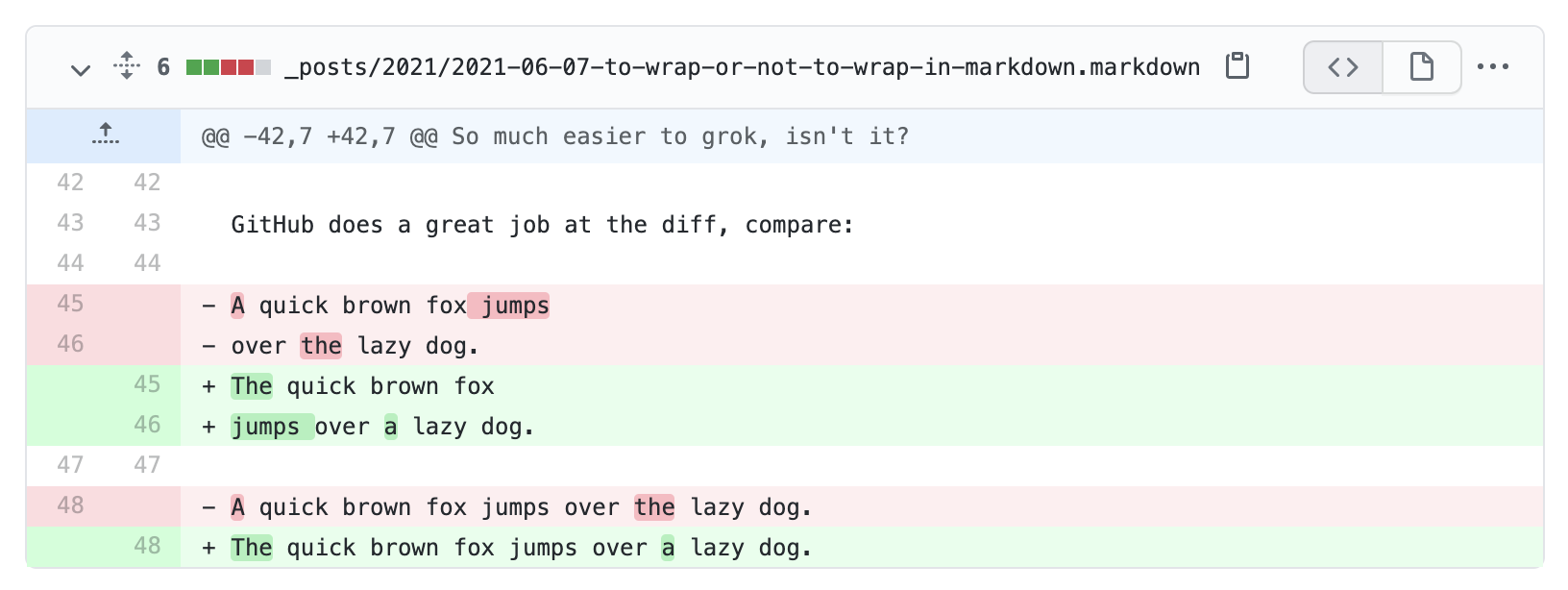
Notice how the word “jumps” was highlighted, even though it wasn’t actually changed.
For an argument for wrapping text, see this comment.
Enforce It
You can enforce one source line per paragraph with a linter, or run a formatter in check mode to reject wrapped paragraphs in CI. Here are configurations for Ruby, JavaScript, and Python projects. Pick the tool you already use.
RuboCop
For Ruby projects, rubocop-prose provides Prose/MaxLength. I added it to this Jekyll blog alongside spelling and Ruby code-example checks in code.dblock.org#176; see Linting Both Prose and Embedded Code with RuboCop. Add it to your Gemfile and run bundle install:
gem 'rubocop-prose', '~> 0.2.0', require: false
Add to .rubocop.yml:
plugins:
  - rubocop-prose

Prose/MaxLength:
  Enabled: true
  Max: false
Here, Max: false means “one source line per paragraph”, not “disable the cop”. It’s also the default. A positive number asks the same cop to wrap paragraphs to that width instead.
Check and fix paragraph wrapping with:
bundle exec rubocop --only Prose/MaxLength README.md
bundle exec rubocop --only Prose/MaxLength -a README.md
This works inside lists and blockquotes, preserves hard breaks and <br>, and leaves headings, tables, and code blocks alone.
Prettier
Prettier knows how to unwrap paragraphs with proseWrap.
npm install --save-dev prettier
Set proseWrap in .prettierrc.json:
{
  "proseWrap": "never"
}
Check formatting in CI, or rewrite files locally:
npx prettier --check "**/*.md" "**/*.markdown"
npx prettier --write "**/*.md" "**/*.markdown"
Use "never", not the default "preserve": preserving existing wrapping would leave already-wrapped paragraphs alone. You don’t need to inflate printWidth to some enormous number. This checks all formatting choices enforced by Prettier, not just paragraph wrapping, and the write command applies them too.
ESLint
eslint-plugin-markdown-preferences-paragraph checks and safely fixes paragraph wrapping with ESLint’s native Markdown support.
Install it alongside ESLint and its Markdown language plugin:
npm install --save-dev eslint @eslint/markdown eslint-plugin-markdown-preferences-paragraph
In eslint.config.js:
import markdown from "@eslint/markdown";
import paragraph from "eslint-plugin-markdown-preferences-paragraph";

export default [{
  files: ["**/*.md", "**/*.markdown"],
  plugins: { markdown, paragraph },
  language: "markdown/gfm",
  rules: {
    "paragraph/wrap": ["error", { width: "nowrap" }],
  },
}];
Check and fix paragraph wrapping:
npx eslint "**/*.md" "**/*.markdown"
npx eslint "**/*.md" "**/*.markdown" --fix
"nowrap" joins soft line breaks without a width limit, including paragraphs in lists, blockquotes, and footnotes. Intentional hard breaks remain separate, and unsafe corrections report without a fix.
markdownlint
markdownlint-rule-single-line-paragraphs is a custom markdownlint rule.
npm install --save-dev markdownlint-cli2 markdownlint-rule-single-line-paragraphs
Create .markdownlint-cli2.jsonc:
{
  "customRules": ["markdownlint-rule-single-line-paragraphs"],
  "config": {
    "default": true,
    "MD013": false,
    "single-line-paragraphs": {
      "enabled": true
    }
  }
}
This disables MD013, the line-length rule, so it doesn’t complain about the long paragraphs you just asked for.
npx markdownlint-cli2 "**/*.md" "**/*.markdown"
Add --fix to join continuation lines automatically:
npx markdownlint-cli2 --fix "**/*.md" "**/*.markdown"
The rule checks prose at the document root and inside lists and blockquotes. It preserves intentional Markdown hard breaks and <br> boundaries. See code.dblock.org#173 for a working example.
I would have preferred this to be built as a new style: single in MD013 as discussed in markdownlint#298, but the repository doesn’t accept AI-generated code and I don’t remember how to write code anymore.
mdformat
For Python projects, mdformat supports --wrap no:
pipx install mdformat
mdformat --check --wrap no README.md
mdformat --wrap no README.md
The check command fails if the file needs formatting; the second command rewrites it. To make this the project default, add .mdformat.toml:
wrap = "no"
The default is "keep", which preserves existing line wrapping. Like Prettier, mdformat also enforces its other formatting choices. It parses CommonMark by default; for GitHub Flavored Markdown, install its extension with pipx inject mdformat mdformat-gfm.